Your Day, Scored
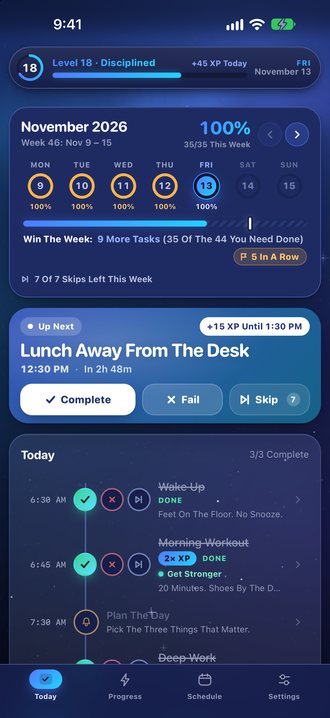
ProDuct Turns Your Daily Routine Into A Game You Actually Want To Win. Set Up Your Week, And When A Task Comes Due, Answer It: Complete, Fail Or Skip. Finish Within An Hour Of Its Time And It Pays Full XP.
Most Planners Let You Tick Boxes And Forget Them. ProDuct Holds You To The Time You Set, Then Shows You Your Streaks, Your Won Weeks And How Each Goal Is Going. It Is Free With A Small Banner Ad, With No Account And No Sign-Up. ProDuct Is On The App Store Now.
Screenshots
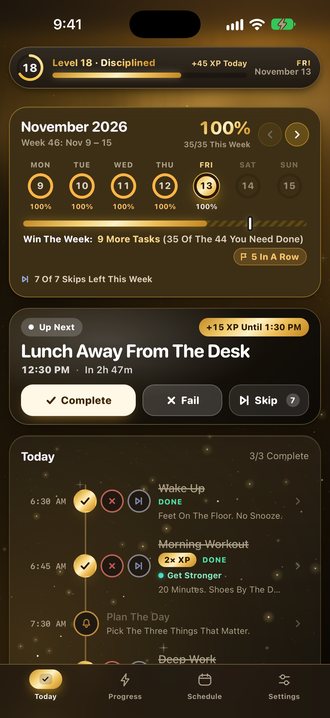
XP, Levels And Streaks
- XP For Every Task You Complete, With A Bonus For Doing It On Time.
- A Perfect-Day Bonus When Every Task Of The Day Is Done.
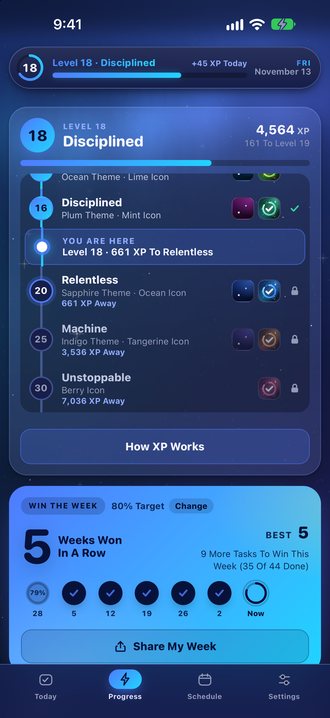
- Levels With Their Own Titles, Shown As A Path On The Progress Tab. Climbing Unlocks New Themes And App Icons, Up To Golden At Level 100, With More Unlocks On The Way.
- A Daily Bonus Task Worth Double XP, A Different One Every Day.
- Trophies To Collect, And A Monthly Challenge To Finish Strong.
- A Day Streak For Days At 80% Or Better, And Win The Week: Hit Your Weekly Target To Build A Streak Of Won Weeks.
- Back After A Few Days Away? Your Comeback Day Pays Extra.
- A Fail Costs A Little XP And A Task Left Unanswered Costs More, So An Honest Answer Always Pays.
- Rest Days That Never Break Your Streak.
Goals With Their Own Rings
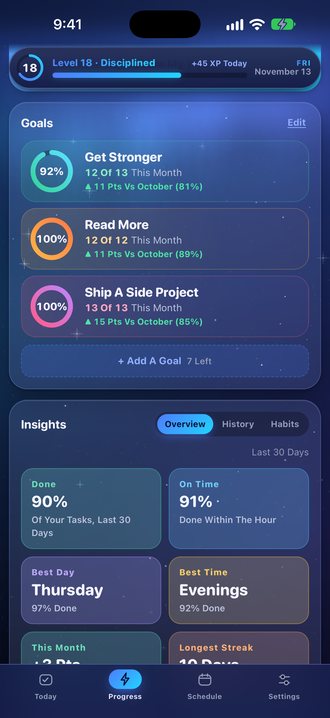
Name A Goal, Or Pick One Like Get Stronger Or Read More, Then Tick The Tasks That Move You Toward It. Each Goal Gets Its Own Ring That Fills With Every Task You Do For It This Month, And Shows How You Compare With Last Month.
Built Around Your Week
- A Schedule That Repeats Every Week, With Profiles For Different Kinds Of Week. Change A Task Once And It Changes On Every Day It’s On, And Give Any Day Its Own Time.
- A Quick Setup: Build Your Day In Three Short Steps.
- Temporary Tasks For A Single Day, And Next Week One Swipe Away For Planning Ahead.
- Reminders That Never Grade You.
- One Insights Card With Your Month At A Glance, History By Day, Week, Month And Year, And Habits That Show What You Keep Up And What You Let Slide.
Widgets, Alerts And Apple Watch
- Alerts With Complete, Fail And Skip Buttons Right On The Notification.
- Home Screen, Lock Screen And Goals Widgets, Each In Any Of The App's Themes.
- A Live Activity On The Lock Screen For The Task You're On.
- An Apple Watch App With Watch Face Complications.
- Siri And Shortcuts: "Complete My Task In ProDuct".
- Your Own iCloud Keeps Your iPhone And iPad In Sync, Or Export A File Whenever You Like.
Free, With Optional ProDuct Pro
ProDuct Is Free With A Single Small Banner Ad. Three Optional In-App Purchases, Each Shown With Its Price In The App Before You Buy:
- Remove Ads: One Payment Removes The Banner For Good.
- ProDuct Pro: One Payment, Yours Forever. It Includes Remove Ads And Adds Every Theme And App Icon From Day One, Up To Ten Goals (One Is Free), Streak Shields So Two Missed Days A Month Don’t Break Your Streak, More Skips Every Week, The Full Insights, A Picture Of Your Week To Share, Medium, Large, Lock Screen And Goals Widgets In Any Theme, Siri Shortcuts And The Full Day On Apple Watch.
- Fresh Start: A Clean Slate Whenever You Want One. It Resets Your XP, Level, Streak And History And Keeps Your Schedules And Settings.
Requirements
iPhone And iPad With iOS 17 Or Later, Apple Watch, And Mac Computers With Apple Silicon.
ProDuct FAQ
Is ProDuct Free?
Yes. ProDuct Is Free With A Small Banner Ad. Remove Ads And ProDuct Pro Are Optional One-Time Purchases, Never A Subscription.
How Does The XP Work?
Every Task You Complete Earns XP, And Finishing Within An Hour Of Its Scheduled Time Earns A Bonus. A Day With Every Task Done Earns A Perfect-Day Bonus, And One Task A Day Pays Double. A Fail Costs A Little XP And A Task Left Unanswered Costs More, So Answering Honestly Always Pays.
Does ProDuct Sync Between My Devices?
Yes. Your Schedule And Progress Sync Through Your Own Private iCloud Account, With No Sign-Up And No Account To Make. They Never Come To Me.
Which Devices Does ProDuct Run On?
iPhone And iPad With iOS 17 Or Later, Apple Watch, And Mac Computers With Apple Silicon.
Do The Ads Track Me?
Only If You Allow Tracking When The App Asks. If You Choose Not To, The App Never Receives Your Device's Advertising Identifier And The Ads Are Chosen From Context Alone. Remove Ads Or ProDuct Pro Removes The Ads Entirely. See The Privacy Policy For Details.
How Do I Get Help?
Send A Message From The ProDuct Support Page. A Person Will Reply, Usually Within 3 Business Days.
Read The ProDuct Privacy Policy, Get Help On The ProDuct Support Page, Or See All Apps.
Apple, iPhone, iPad, Apple Watch, Mac, iCloud, Siri and App Store are trademarks of Apple Inc.